

 OpenClaw Assistant
OpenClaw is an open-source, self-hosted personal AI assistant that connects to messaging platforms including WhatsApp, Telegram, Slack, Discord, Google Chat, Signal, Microsoft Teams, and more.
Use this starter kit when you want Diploi to run an OpenClaw instance without having to manually configure the hosting infrastructure for it.
Besides offering the easiest way to host OpenClaw on the cloud, Diploi has features that help you start even faster:
-
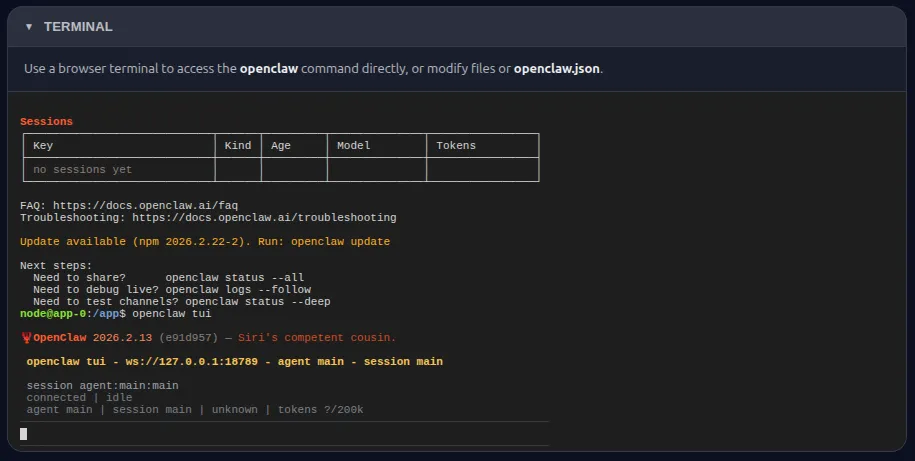
Access to a browser terminal, to run CLI commands without requiring a SSH connection.
-
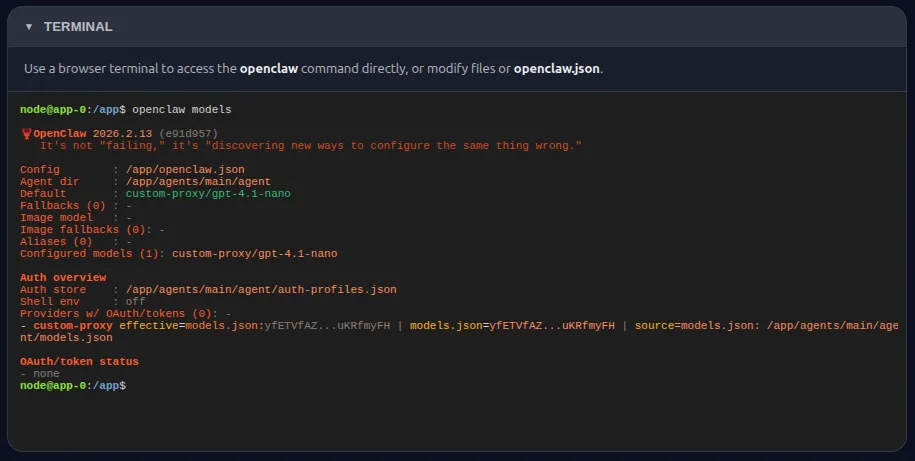
Fully configured gpt-4.1-nano model, provided through the Diploi AI gateway.
Launch
Section titled “Launch”Launch OpenClaw Assistant on Diploi to create a new project from this starter kit. Like any Diploi project, it can be extended with more components and add-ons through its diploi.yaml file.
Tech stack
Section titled “Tech stack”| Technology | Role |
|---|---|
| Node.js | Runtime |
| TypeScript | Language |
| Hono | Wrapper API server |
| React + Vite | Control UI frontend |
| OpenClaw | AI assistant runtime |
| gpt-4.1-nano | AI model, through the AI Gateway |
Key features
Section titled “Key features”- Multi-platform messaging - WhatsApp, Telegram, Slack, Discord, Google Chat, Signal, Microsoft Teams, and more
- Browser terminal - Run OpenClaw CLI commands directly from the browser without SSH
- Pre-configured AI model - gpt-4.1-nano ready out of the box via the Diploi AI gateway
- Custom control panel - Welcome page to monitor status, start/stop the gateway, and reset your instance
- API-driven management - REST endpoints for programmatic control of the gateway
- Self-hosted & open-source - Full ownership of your data and infrastructure
Control panel
Section titled “Control panel”Once launched, a welcome page unique to Diploi lets you:
- See the general status of your OpenClaw gateway
- Start/Stop the gateway globally
- Reset OpenClaw to its startup defaults
- Interact with the browser terminal and access the OpenClaw CLI
- Access the OpenClaw dashboard
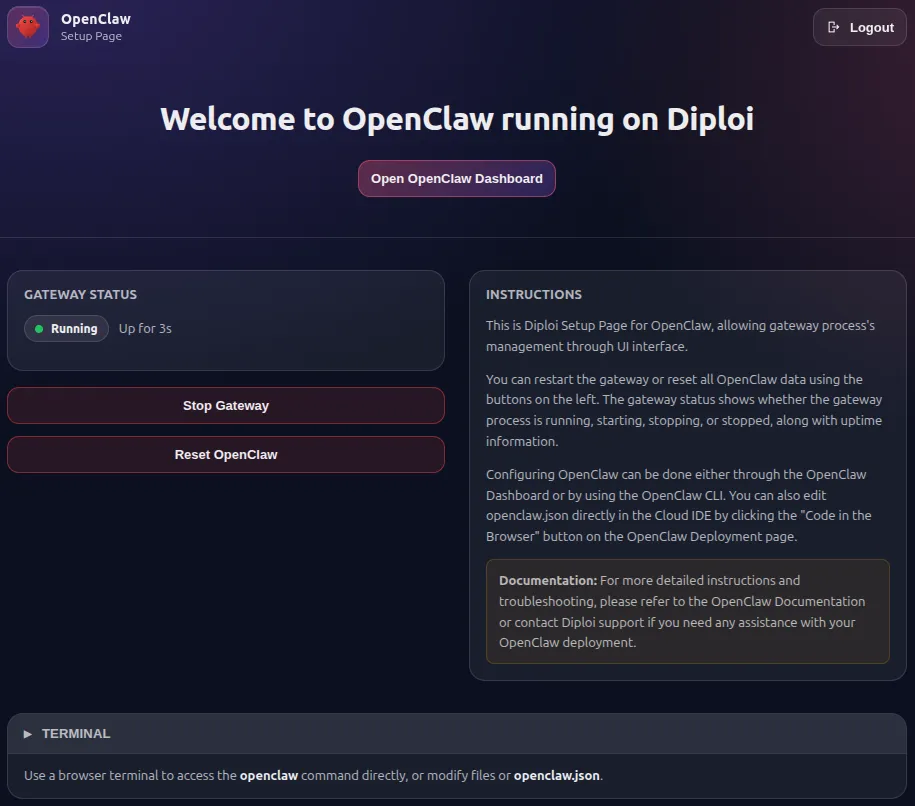
The OpenClaw dashboard itself hasn’t been modified, so you can expect the exact experience you would get if you configured OpenClaw manually. How the wrapper works, its API endpoints and environment variables are described in the readme below.
Readme
Section titled “Readme”OpenClaw Starter Kit for running a self-hosted OpenClaw in Diploi Development Environment with:
- A wrapper server (
server/) that initializes config, manages the OpenClaw gateway, and exposes control APIs - A React/Vite control UI (
web/)
Version 2.0 updates the bundled OpenClaw runtime to v2026.8.1 and introduces a secure owner-handoff flow for opening the OpenClaw dashboard.
✨ Overview
Section titled “✨ Overview”On startup, the wrapper:
- Initializes
/app/openclaw.json(if missing) viaopenclaw onboard - Patches config defaults (gateway token, model provider, channel/plugin defaults)
- Starts and monitors the OpenClaw gateway on
127.0.0.1:18789 - Proxies:
/dashboardto OpenClaw gateway UI- all other app routes to the Vite frontend
Dashboard access in v2.0
Section titled “Dashboard access in v2.0”Selecting Open dashboard opens a loading page while the wrapper requests a signed owner-handoff URL from OpenClaw. The browser then opens the dashboard on the public application origin, preserving the signed handoff data without exposing the gateway’s internal URL.
For compatibility with older OpenClaw releases that do not support owner-handoff URLs, the wrapper falls back to the existing gateway-token flow.
🧱 Architecture
Section titled “🧱 Architecture”Requirements
Section titled “Requirements”- Diploi’s Development Environment
- Node.js 22+
- npm
- OpenClaw runtime available as either:
openclawonPATH, or/lib/openclaw/dist/index.js(provided in this repo’s Docker images)
Environment Variables
Section titled “Environment Variables”Common variables used by the wrapper:
PORT(default:3000)HOSTNAME(default:0.0.0.0)VITE_HOST(default:127.0.0.1)VITE_PORT(default:5173)OPENCLAW_CONFIG_PATH(default:/app/openclaw.json)OPENCLAW_STATE_DIR(default:/app)OPENCLAW_WORKSPACE_DIR(default:/app/workspace)OPENCLAW_GATEWAY_TOKEN(optional; generated if missing)DIPLOI_AI_GATEWAY_URL/DIPLOI_AI_GATEWAY_TOKEN(optional model proxy wiring)DIPLOI_LOGIN_SECRET(required to validatediploi-jwt-logincookie)DIPLOI_LOGIN_USERNAME/DIPLOI_LOGIN_PASSWORD(credential login)
Development Workflow
Section titled “Development Workflow”Install dependencies:
npm installRun dev mode (process manager + wrapper API + Vite UI):
npm run devThis starts:
server/processManager.tsserver/index.ts(Hono wrapper API)webVite dev server
API Endpoints
Section titled “API Endpoints”Wrapper endpoints:
GET /healthzGET /dashboard-loading(temporary page shown while the dashboard handoff is created)GET /api/dashboard-link(returns the signed dashboard handoff path, with a legacy token fallback)GET /api/dashboard-token(legacy compatibility)GET /api/gateway/statusPOST /api/gateway/startPOST /api/gateway/stopPOST /api/gateway/restartPOST /api/full-resetPOST /api/logoutWS /api/terminal-ws(browser terminal)
Project Structure
Section titled “Project Structure”server/ index.ts # wrapper server + proxy processManager.ts # gateway lifecycle manager initOpenclaw.ts # OpenClaw config bootstrap + patching api.ts # API routes terminalWs.ts # PTY websocket bridge utils/ dashboardLoading.ts # dashboard handoff loading pageweb/ src/ # React UIDockerfile.dev # full dev image including OpenClaw buildDockerfile # production runtime imagediploi.yaml # Diploi starter metadata